Is Minecraft Cross-Platform? Java vs Bedrock Explained
Is Minecraft cross-platform? Yes on Bedrock: Windows, Xbox, PlayStation, Switch, mobile and Chromebook play together. Java only plays with Java. Here's how.
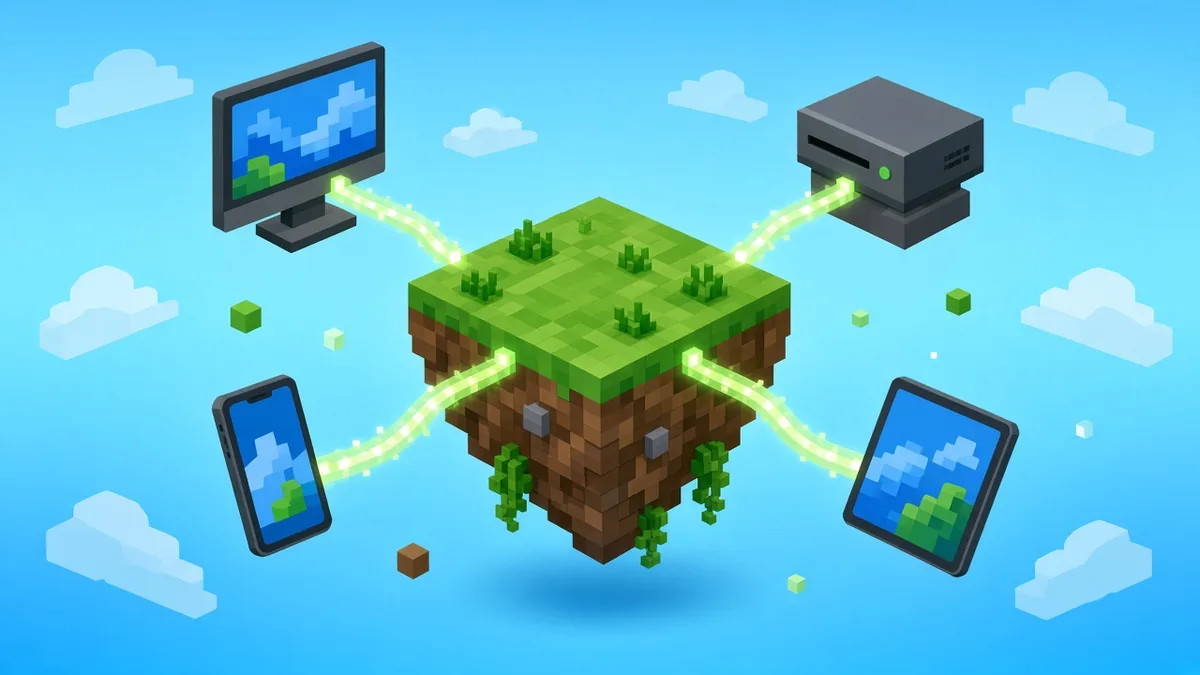
Yes, Minecraft is cross-platform as long as everyone plays Bedrock Edition: Windows, Xbox, PlayStation, Nintendo Switch, Switch 2, iOS, Android and Chromebook all play together as of November 2026 (Bedrock 26.60). Java Edition, on Windows, macOS and Linux, only plays with other Java players, and Mojang’s own store page says Java players can only play with other Java players.
So the real question isn’t your device. It’s your edition.
Minecraft crossplay by platform
Here’s where each version stands. Console players need their platform’s online subscription to play with anyone outside their living room, and every Bedrock player needs a free Microsoft account to add cross-platform friends.
| Platform | Edition | Plays with | Online play needs |
|---|---|---|---|
| Windows PC | Java and Bedrock (sold together) | Whichever pool you launch | Microsoft account |
| macOS, Linux | Java | Java players only | Microsoft account |
| Xbox One, Series X|S | Bedrock | All Bedrock platforms | Xbox online subscription |
| PS4, PS5 | Bedrock | All Bedrock platforms | PlayStation Plus + Microsoft account |
| Switch, Switch 2 | Bedrock | All Bedrock platforms | Nintendo Switch Online + Microsoft account |
| iOS, Android, Chromebook | Bedrock | All Bedrock platforms | Microsoft account |
Local split-screen on consoles doesn’t need a subscription. Anything over the internet does.
Can Java and Bedrock players play together?
Not officially. The two editions run different code and connect to different servers, so a Java player can’t join a Bedrock world or server, and the reverse is true too. No in-game setting changes that.
Two things soften the split. First, Windows players get both editions in one purchase, so a PC player can simply launch Bedrock to join console friends. Second, some Java servers run third-party proxy software, such as GeyserMC, that lets Bedrock players connect. That’s unofficial, it depends on the server owner, and it can break for a while after big updates. Treat it as a server feature, not a Minecraft feature.
Is Minecraft cross-platform on PS5, Xbox and Switch 2?
Yes, all three run Bedrock and share one player pool. The newest addition is Switch 2: Mojang released a native Minecraft for Nintendo Switch 2 on October 27, 2026, alongside Bedrock 26.60, as Mojang announced on minecraft.net.
Mojang’s announcement says existing Switch owners get a digital upgrade path and can carry their worlds over. Nothing in it changes who you can play with, so a Switch 2 player joins PS5, Xbox, PC and phone friends exactly like before. Before launch, Switch 2 owners were already playing the original Switch version through backward compatibility, and that version stayed in the same pool.
Does Minecraft have cross-progression?
Partly. On Bedrock, Marketplace content and skins are tied to your Microsoft account, so buying a map pack on Xbox generally makes it available on your phone too. Two caveats matter:
- Nintendo Minecoins: Mojang’s Minecoins help page says that from October 27, 2026, Minecoins bought on Nintendo can only be spent on Nintendo, and Minecoins bought on other platforms can’t be spent on Nintendo. Coins you already had move to a Legacy Wallet that keeps working. Check your wallet screen before buying.
- Worlds don’t sync by themselves: a world saved on your console stays on that console. To play the same world on several devices, host it on Minecraft Realms, Mojang’s paid hosting, or on a server.
Java and Bedrock share nothing: separate worlds, separate purchases. For the bigger picture beyond Minecraft, our report on the cross-save standard for 2027 releases covers where shared progress across consoles is heading.
How to play Minecraft cross-platform
Once everyone is on Bedrock, the setup takes a couple of minutes:
- Make sure everyone has updated to the same version. Consoles sometimes get patches a day apart, and a version mismatch blocks joining.
- Sign in to a Microsoft account from the main menu on every device.
- Open the Friends tab under Play and add each other by gamertag.
- The host opens a world, pauses and picks Invite to Game. Everyone else accepts the invite or joins from the Friends tab.
- For a world that’s always online, even when the host isn’t, pay for Minecraft Realms or use a server.
Buying a new console just to play with friends? Pick the edition first, then the hardware. Every console runs Bedrock, so any of them works, and our guide to which console to buy in late 2026 can settle the rest.
For more Minecraft, see who Minecraft Steve is and how to turn on keep inventory in Java. Your group plays other games too? Our Deep Rock Galactic crossplay guide covers another co-op favourite.
Minecraft crossplay FAQ
Is Minecraft cross-platform between PC and Xbox?
Yes, if the PC player launches Bedrock Edition. Windows copies include both Java and Bedrock, and only Bedrock connects to Xbox. If your PC friend is on Java, they’ll need to switch editions, since Xbox has no Java version and the two don’t connect.
Can Minecraft mobile play with PC?
Yes. Phones and tablets run Bedrock, so they play with Windows players on Bedrock as well as with every console. Mobile needs no subscription, only a Microsoft account to add friends. A PC player on Java can’t join a mobile world.
Same edition, same version, one Microsoft account each. Get those three right and the device stops mattering.
Cassia Fenwick
Cassia Fenwick is a staff writer at Console Alley, covering console gaming from the latest hardware questions to the games players return to for years. Her work moves across news, practical guides, reviews, gaming gear, and the wider culture around games. Whether she is breaking down a new console feature or explaining a mechanic in a familiar favorite, she writes with a straightforward goal: help readers understand what matters and what to do next. She pays particular attention to the small details that shape the playing experience. A controller compatibility rule, a battery-life setting, a difficult-to-find resource, or a change introduced by a game update can make the difference between a frustrating evening and a rewarding one. Her published coverage includes Nintendo Switch and Switch 2 questions, Terraria, Stardew Valley, and The Sims 4, with explanations that welcome readers who may be discovering a game for the first time or returning after time away. Cassia's style is clear, patient, and grounded in practical examples. Rather than assuming readers already know the terminology, she begins with the question at hand, adds the context that genuinely helps, and keeps instructions easy to follow. She is interested not only in how a feature works, but also why its design matters—especially when a small interaction, interface decision, or unexpected mechanic changes how a game feels. Outside her gaming coverage, Cassia enjoys colorful postcards, making books, and noticing the shapes, colors, and details built into everyday objects. That curiosity carries naturally into her writing, where overlooked features and thoughtful design can provide a fresh way to look at a game. Her aim is for every article to be useful on its own: approachable enough for a newcomer, specific enough for someone looking for a quick answer, and enjoyable enough to leave readers with something new to explore.


2 comments