Minecraft Steve: Who He Is, His Skin and How to Use It
Minecraft Steve is the original default skin, created by Notch in 2009, with no official backstory. Who he is, the nine default skins and how to use Steve.
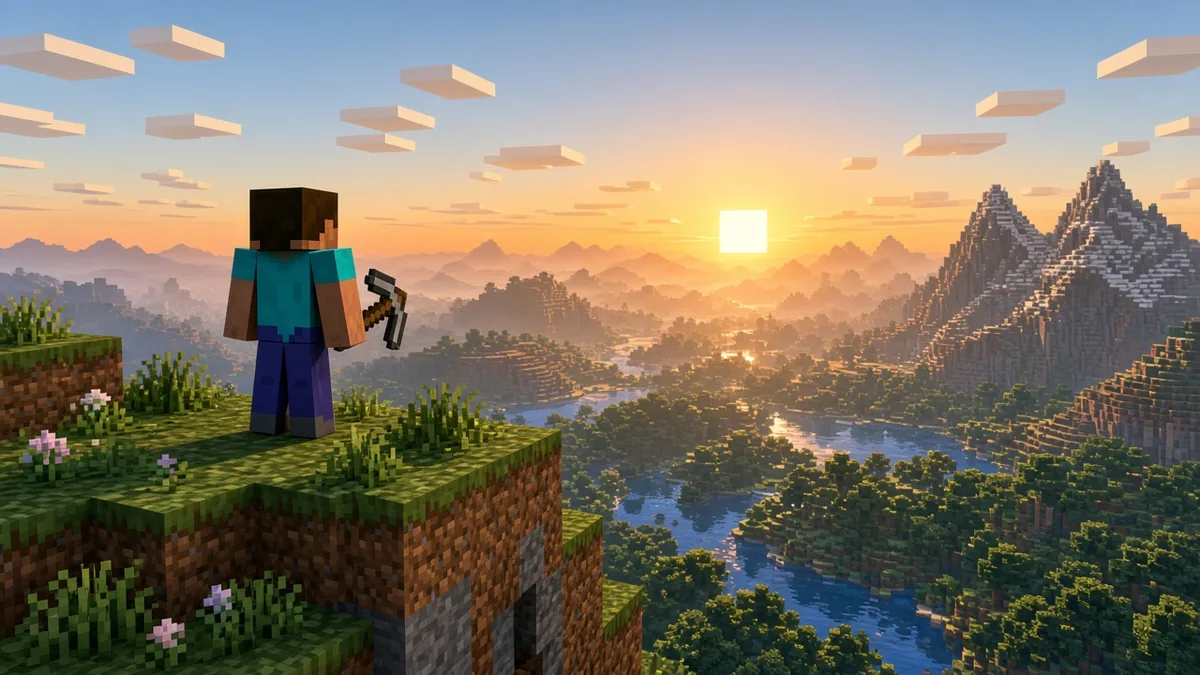
Minecraft Steve is the game’s original default player skin: the blocky guy in the light blue shirt and blue pants, created by Markus “Notch” Persson and in the game since the first public Java build in 2009. He has no official backstory, because he’s meant to be you. As of November 2026, Steve is one of nine default skins in both Java and Bedrock Edition, and he uses the “classic” player model with 4-pixel-wide arms. Below: where the name came from, how Steve differs from Alex, how to switch to him, and where he shows up outside the game.
Who is Steve in Minecraft?
Steve is a placeholder that became a mascot. Mojang never wrote him a story or gave him dialogue, and the game itself just calls you “the player.” The name started as a joke: Persson picked “Steve” because it sounded generic, the community ran with it, and Mojang later made it official in Bedrock Edition, according to Wikipedia’s history of the character.
Persson has said the character was never meant to have a gender. Separately, Steve’s goatee was removed in 2009, during the Classic era, and came back in August 2022, when Mojang refreshed Steve’s and Alex’s textures using the multi-layer skin format. That update is why current Steve has more shading on his face and clothes than the flat 2009 version.
Steve’s design also spawned Herobrine, the white-eyed creepypasta that first appeared on 4chan in 2010. Herobrine was never in the game; Mojang has nodded to the joke in patch notes and artwork over the years, but he’s fan lore, not a character.
Steve vs Alex and the other default skins
For five years Steve was the only default skin on PC. Alex arrived on August 22, 2014 with the Java Edition 1.8 pre-release, with orange hair in a ponytail and narrower arms. On October 20, 2022, Mojang added seven more: Noor, Sunny, Ari, Zuri, Makena, Kai and Efe, all built on the same two body shapes.
The real mechanical difference is the model, not the character. Steve uses the classic model with arms 4 pixels wide; Alex uses the slim model with 3-pixel arms. Every default skin comes in both shapes in Java Edition. Hitbox and abilities are identical either way: the player is 1.8 blocks tall and 0.6 blocks wide, per the Minecraft Wiki, whichever skin you wear.
Any Steve-style skin lives on one 64 x 64 pixel PNG. Here’s how that sheet is laid out, which is the part most skin guides skip.
Two practical tips fall out of that map. Edit the outer layer for hoodies, glasses or hats so the base skin stays clean underneath. And if you make a slim skin, the last two pixel columns of each arm area go unused, so art drawn for Steve’s wide arms will look cut off on an Alex-model skin.
How to play as Steve in Java and Bedrock
Java Edition assigns one of the nine defaults based on your account if you never picked a skin, so you might not be Steve right now. Switching takes a minute.
Java Edition (PC):
- Open the Minecraft Launcher and select Minecraft: Java Edition.
- Go to the Skins tab.
- Choose Steve from the default skins, or upload your own 64 x 64 PNG and set the player model to Classic.
- Save. The skin applies the next time you join a world or server.
Bedrock Edition (Windows, consoles, mobile):
- From the main menu, open the Dressing Room.
- Open Character (or Classic Skins) and find the default skins.
- Select Steve and confirm.
Platform note: on Bedrock, importing a custom PNG skin works on Windows and mobile; on Xbox, PlayStation and Switch you’re limited to defaults, the character creator and Marketplace packs. Setting up a new console for Bedrock? Our list of the first ten settings to change on a new console is worth a pass before your first world. Mojang’s Java Edition skins help page covers the launcher steps if the menu has moved.
Steve outside Minecraft: Smash, the movie and more
Steve has become one of the most recognizable characters in games. In BAFTA’s April 2024 players’ poll of more than 4,000 people, he ranked 13th among the most iconic video game characters.
- Super Smash Bros. Ultimate: Steve joined on October 13, 2020 as part of Fighters Pass Vol. 2, with Alex, a Zombie and an Enderman as alternate costumes. His mining and crafting moveset made him a top competitive pick, and several tournaments banned him in 2023.
- A Minecraft Movie (April 2025): Jack Black played a live-action Steve, written as a doorknob salesman who finds his way into the Overworld. The sequel, A Minecraft Movie Squared, is scheduled for 2027, with Kirsten Dunst cast as Alex, as TheWrap reported in March 2026.
- Other games: Steve is a skin in Minecraft Dungeons, where he was the most-picked skin, and a guest in Super Meat Boy on PC and Sonic Racing: CrossWorlds as DLC.
For more Minecraft, see how to turn on keep inventory in Java and what horses eat in Minecraft.
Minecraft Steve FAQ
Is Steve a boy or a girl?
Officially, neither. Notch has said the Minecraft player character was meant to be genderless. The goatee came off in 2009, but no official source ties that change to gender. The name and the 2022 goatee make Steve read as male to most players, but Mojang treats every default skin as just a look for the same player.
Does Steve have a last name or official backstory?
No. Mojang has never given Steve a surname, family or story inside the game. A Minecraft Movie gave its version of Steve a backstory as a doorknob salesman, but that’s the film’s take and doesn’t change the game. Fan theories, including Herobrine being Steve’s brother, are community lore only.
How tall is Steve in Minecraft?
The player is 1.8 blocks tall and 0.6 blocks wide, according to the Minecraft Wiki, which works out to roughly 1.8 meters if you treat a block as one meter. Sneaking lowers that height. The skin you wear, Steve or any other, doesn’t change the hitbox or any stats.
Steve was a joke name on a placeholder skin. Seventeen years later, he’s the face of one of the best-selling games of all time.
Cassia Fenwick
Cassia Fenwick is a staff writer at Console Alley, covering console gaming from the latest hardware questions to the games players return to for years. Her work moves across news, practical guides, reviews, gaming gear, and the wider culture around games. Whether she is breaking down a new console feature or explaining a mechanic in a familiar favorite, she writes with a straightforward goal: help readers understand what matters and what to do next. She pays particular attention to the small details that shape the playing experience. A controller compatibility rule, a battery-life setting, a difficult-to-find resource, or a change introduced by a game update can make the difference between a frustrating evening and a rewarding one. Her published coverage includes Nintendo Switch and Switch 2 questions, Terraria, Stardew Valley, and The Sims 4, with explanations that welcome readers who may be discovering a game for the first time or returning after time away. Cassia's style is clear, patient, and grounded in practical examples. Rather than assuming readers already know the terminology, she begins with the question at hand, adds the context that genuinely helps, and keeps instructions easy to follow. She is interested not only in how a feature works, but also why its design matters—especially when a small interaction, interface decision, or unexpected mechanic changes how a game feels. Outside her gaming coverage, Cassia enjoys colorful postcards, making books, and noticing the shapes, colors, and details built into everyday objects. That curiosity carries naturally into her writing, where overlooked features and thoughtful design can provide a fresh way to look at a game. Her aim is for every article to be useful on its own: approachable enough for a newcomer, specific enough for someone looking for a quick answer, and enjoyable enough to leave readers with something new to explore.


